How to Set Up a Smart Water Tank System in Your Home
A complete guide to fitting a water level controller in Indian homes, apartments and villas, from choosing the right model to connecting the app.
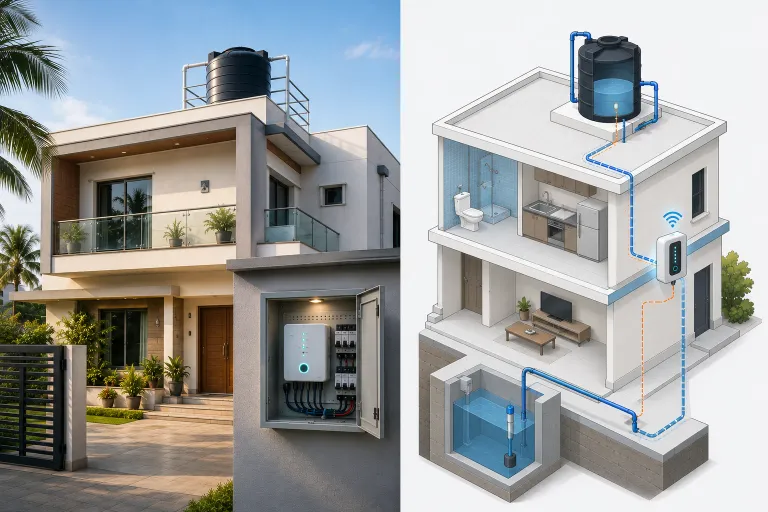
Setting up a smart water management system sounds complicated. It isn’t. Most homes in India, whether you’re in an independent house, a villa, or a flat with your own pump, can be set up and running in an afternoon. Here’s exactly how it works.
What You Need Before You Start
Before installation day, gather these details:
About your water setup:
- What is your water source? Sump/municipal, borewell, or both?
- How many overhead tanks do you have?
- Where is your electrical panel (DB box) located?
Measurements (in centimetres):
- The internal height of your overhead tank(s)
- The internal height of your sump, if applicable
These measurements are collected during checkout and used to calibrate the controller’s level sensors. No special equipment needed, a tape measure is sufficient.
What’s already in place:
- Your existing water pump/motor (SwitchFlo works with single-phase and three-phase motors; if you are unsure about yours, send us a photo of the motor’s nameplate)
- A WiFi network at home, for the app. The controller fills your tanks and protects your motor without it
Choosing the Right SwitchFlo Model
SwitchFlo comes in three models. The right one depends on where your water comes from and how many motors you run:
- Sump and overhead tank, one motor → Sump+. It watches the overhead tank and the sump with 8 level sensors, and has 1 dry-run sensor at the sump.
- Borewell into one overhead tank → Ground+. It watches the overhead tank with 4 level sensors, and has 1 dry-run sensor at the borewell.
- Borewell and sump, two motors → Ultra. It runs a borewell pump and a sump pump into two separate overhead tanks, watches both tanks and the sump with 12 level sensors, and has 2 dry-run sensors, one at each source.
All three connect to the SwitchFlo app. Filling, dry-run protection and the safety rules run on the controller itself, so they keep working if your internet drops. If you need a model that never connects to the internet, contact us.
Use the model selector on our SwitchFlo page if you’re unsure. If you are still comparing controllers, what a water level controller costs in India explains what each price band buys.
Step-by-Step Installation Overview
SwitchFlo is installed at your electrical panel by a professional. Here’s what that process looks like:
1. Book an electrician
Contact a local professional electrician. Installation typically takes 1–2 hours. Most electricians are familiar with motor controllers. SwitchFlo is an enclosed unit that mounts on the wall near your motor switchboard, with the screws and wall anchors in the box. If you need help, our team at +91 90638 82298 (WhatsApp) can guide your electrician through the process.
2. The controller is mounted at the DB box
The SwitchFlo controller sits between the main power supply and your motor. The electrician connects:
- Power input (from your DB box)
- Motor output (to your pump)
- Level sensor wires (run to your tanks)
The unit is mounted on the wall near your motor switchboard, not near water.
3. Level sensors are installed
Sealed magnetic float sensors are lowered into your tank at the appropriate heights. Each monitored tank gets four, so SwitchFlo reads its level from empty to full: the motor starts when the tank runs low and stops when it reaches full.
Sensor wires run from the tanks back to the controller. In most homes, this routing follows existing conduit paths. The sensors sit in the water, but no electrical contact ever meets it, so there is nothing to corrode.
Each motor also gets its own dry-run sensor, fitted at that motor’s water source: the sump or the borewell.
4. The controller powers on
Once wired, the electrician powers up the system and cycles the motor manually to confirm the wiring is correct.
Connecting to the SwitchFlo App
The next step is connecting the controller to the mobile app. Download the free SwitchFlo app from the App Store (iOS) or Google Play (Android), and the app walks you through adding the controller to your home WiFi.
Testing Your Setup
Before the electrician leaves, run through this checklist:
Manual control test:
- From the app (or via the controller’s physical button), switch to Manual mode
- Turn the motor ON manually, confirm the pump runs and water flows
- Turn it OFF manually, confirm the motor stops
Auto mode test:
- Switch to Auto mode
- If the tank is low, the motor should start automatically
- Fill the tank and watch for the auto-stop when it reaches the Full sensor level
Dry-run protection check:
- Confirm a dry-run sensor is fitted at each motor’s water source
- Check the dry-run delay in the app. It sets how long the controller waits to confirm the source has run out before cutting power, so a borewell that is slow to prime does not cause false trips
If all three checks pass, your setup is complete.
Common Questions After Installation
The motor doesn’t start in Auto mode, why? Check that the tank level is actually below the “Empty” sensor. If the tank is partially full, the controller correctly decides not to run the motor. Also confirm the controller is in Auto mode (not Manual) and that the motor relay is enabled in the app.
The app shows “Device Offline”, what do I do? Check that your home WiFi is working. The controller may have lost its connection, power cycle the controller (turn it off and on at the DB box) and it will reconnect automatically.
Can I change the tank level thresholds? The levels are set by the physical position of the sensors in the tank, so changing them means moving the sensors. Our support team can advise on the right positions for your tank.
The motor starts and stops every few minutes, is that normal? No. This usually means the sensors are too close together, causing rapid cycling. Check the sensor positions and ensure the Full sensor is significantly above the Empty sensor. Our support team can advise on the correct spacing for your tank dimensions.
If you have any questions about installation or setup, message us on WhatsApp at +91 90638 82298. We typically respond within a few hours.
Automate your water system with SwitchFlo
Dry-run protection, overflow prevention, and mobile app control. Starting from ₹12,999 with free shipping across India.
Explore SwitchFlo